How to Setup CabMaster for Beginners
CabMaster is a great design tool for creating custom cabinets and furniture layouts. If you're new to it, this guide will help you quickly set up the software and start designing with ease.
The following video provides a great overview of how to set up a new installation of CabMaster.
Step-by-step Instructions
Introduction
1. Open up your latest installation of CabMaster. If you do not have CabMaster installed, please follow instructions here. Make sure you have CMCabinets selected by default in the drop down and then Create New Drawing.
2. You will then see a window showing options for Templates. Select your version and make sure the "Use drawing properties" is checked
3. Once CabMaster has opened, you will see a Drawing Properties window pop up. During this initial set up, leave Drawing Properties as default by click
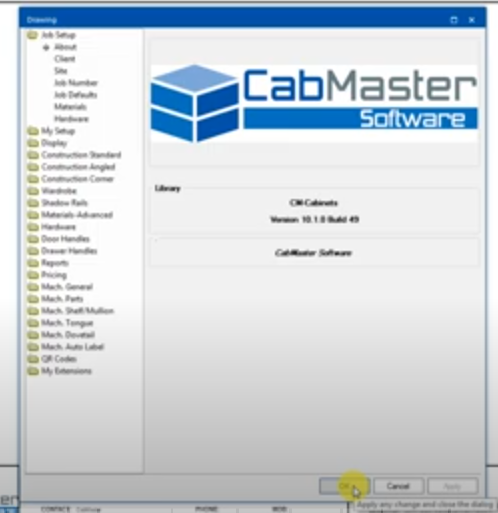
3. If you need to go back and adjust Drawing Properties, it is displayed in the right hand corner of the ribbon as a spanner icon.

Default Settings
Materials
Hardware
My Setup
How to construct ends
Overheads
Minimum Shelf Space
Rail Options
Support
Gaps
Angled cupboards
Corner cupboards
Shadow Rail
Shadow Rail cuttings
Material Advanced
Job Set up
Hinges
Shelf Set up
Related Articles
Creating new materials
Creating New Materials in CabMaster Creating new materials in CabMaster is a simple process. This article describes the process of creating a Door material, although the process can be applied to any of the other categories. The following video ...Saving Default Properties in CabMaster
Configuring default settings can make drawings a breeze Saving default properties is different depending on the Cabmaster version Click Here for help on the Designer Lock, 3D or CL versions 1. Click on File > Prepare > Catalog Properties 2. A warning ...What's New - CabMaster V12 Build 40 Release Update
CABMASTER UPDATE V12 CabMaster V12 Features Application 12.0.0.40 Library 12.000.2.1 There are some exciting new features in the new version 12 release. Some of these changes include: 64-bit application New CM-Design-2 models library Walkthroughs ...Installing CabMaster
Step-by-step instructions Download and Run 1. Download the latest CabMaster install CD. Click to Download the Latest Version 12 CD 2. To run the downloaded EXE file, right click the Exe and select 'Run as administrator' 3. Select 'Yes' on the User ...Setup Quick Access Toolbar
The Quick Access Toolbar is a useful feature for quicker drawings. In Cabmaster, you can set up the Quick Access Toolbar. It's quick and easy to set up. Click Here to expand and watch the Quick Access Toolbar walkthrough video The following video ...